
This solution, ASMToolKit, offers a complete package for aerodrome safeguarding allowing the construction of the complex 3D surfaces from the following regulatory bodies:
- ICAO Annex 14
- UK CAA CAP 168
- FAA Part 77 (Under Development)
- German VFR
The parameters that control the creation of the surface can be changed by the user and this is simply done by editing a XML file that contains the parameters.
The user has the option to construct the surfaces that are required and with the mapping/image features in the CAD system can visually see the real world and terrain, including the ability to have a Google Earth capture in the background or even export for Google Earth to overlay.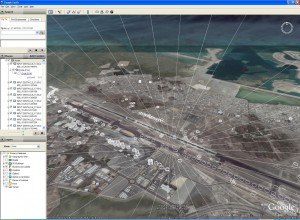
Obstacles can be placed and then using the unique PDToolKit Obstacle Analysis Engine, the user can build custom reports using XML Style Sheets.
Once these surfaces have been created full obstacle planning, restriction and analysis can be performed by the user with customisable reports through XML style sheets. Obstacles can be added by the user or loaded from a data source, such as survey files, spreadsheet, etc. The unique obstacle evaluation tool will analyse each obstacle with the 3D surfaces to calculate if the obstacle has penetrated through the surface. The results of the obstacles evaluation give precise information like:
- Exact point the obstacle would penetrates through the surface
- Distance of penetration above the surface
- Distance under the surface (ideal for vegetation that grows)
- Obstacle ID and surface name for easy review in CAD
Some obstacles just under the surface are of interest because they might be a tree that will grow over time; ASMToolKit allows the user to assign the “vegetation” attribute. This will assist in the reporting process to highlight such obstacles that might be a problem as time goes by.
To compliment ASMToolKit, ASD has created ASDSmartView to handle fast, easy and quick obstacle assessment through a web portal. ASDSmartView has been designed to simplify the task of obstacle assessment around  aerodrome surfaces, being a cloud service ASDSmartView can be used from different types of computer devices that have access to the internet. Further details can be found on the following ASDSmartView page.